


Can screen time cause jaw pain?
What is tech neck and how does it affect the jaw?
Why do I clench my jaw looking at screens?
How do I stop clenching at my desk?
Does a night guard help with screen-related tension?

You finish a long day at your desk and your jaw is tight. You didn’t grind your teeth. You weren’t particularly stressed. You were just sitting there, working — and somehow your jaw is sore.
This is not coincidence. Screen use drives jaw tension through three distinct mechanisms that operate simultaneously during a normal workday. Most people are aware of the posture piece — the “tech neck” story has been well told. But posture is only one of three drivers, and it’s not always the most significant one.
This article explains all three mechanisms, how to tell which ones are affecting you, and a practical daily protocol that actually addresses the problem rather than just describing it.
Three Mechanisms, Not One
The “screen time hurts your jaw” story is usually told as a posture story. It is partly that — but framing it as only a posture problem misses two other mechanisms that operate independently of posture and explain why people who sit with perfect ergonomics still develop jaw tension from screen use.
The three mechanisms are:
- Forward head posture — the mechanical load transfer from neck to jaw muscles via the shared muscle chain
- Concentration-induced clenching — the sympathetic arousal that focused screen work produces, which elevates jaw muscle tone without any postural component
- Movement deprivation — the cumulative stiffness that develops in jaw and neck muscles during long static periods, lowering the threshold at which tension becomes pain
For most desk workers, all three are operating simultaneously for 6–10 hours a day. Understanding them separately matters because the interventions for each are different.
Mechanism 1: Forward Head Posture and the Jaw-Neck Muscle Chain
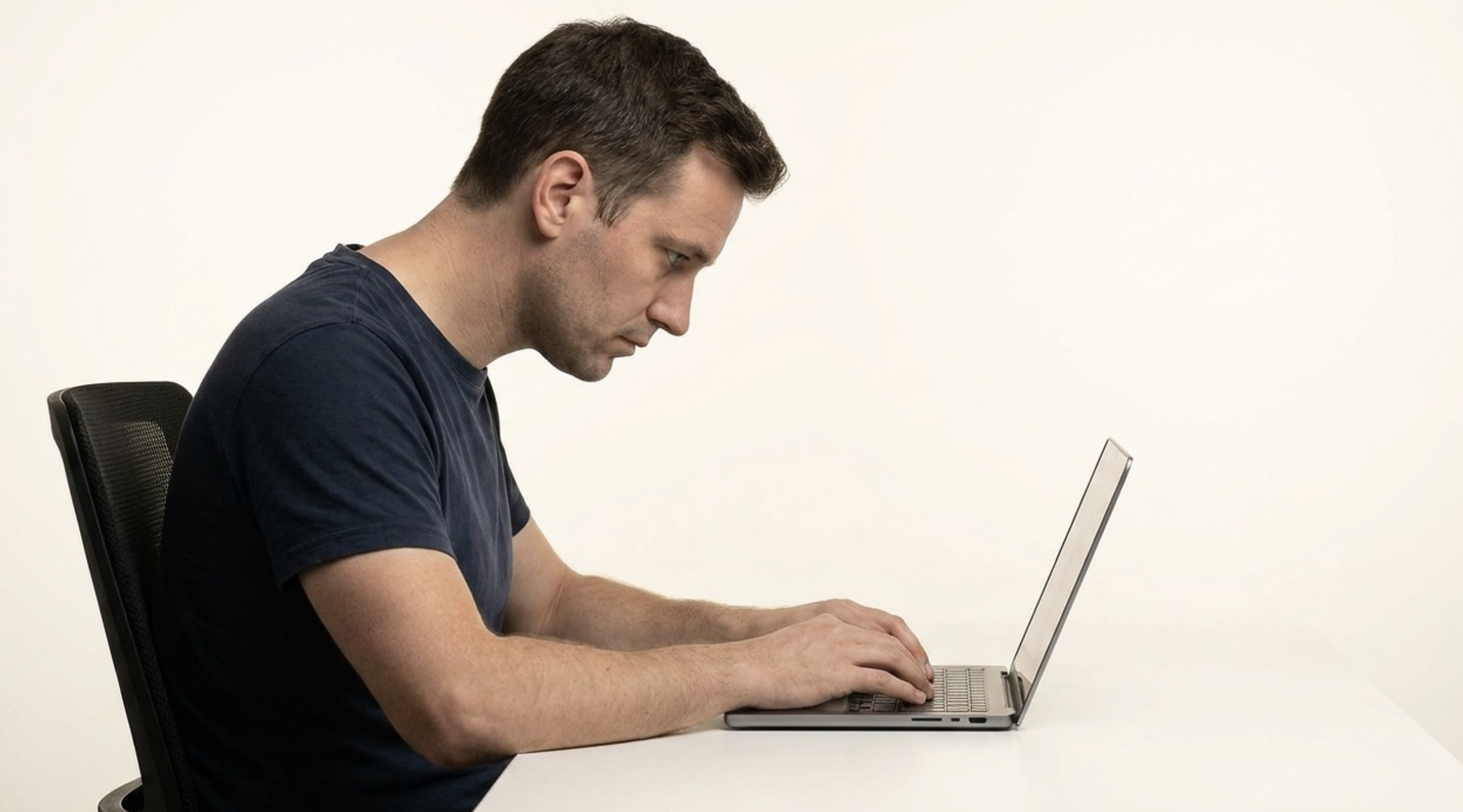
The head weighs approximately 4–5 kg in a neutral position — ears directly over the shoulders, spine stacked vertically. As the head moves forward from this position, the mechanical load on the muscles holding it up increases substantially. The neck and jaw muscles that bear this load are part of a continuous muscular chain — tension in one propagates into tension in the others.
The jaw muscles — particularly the masseter, temporalis, and the suprahyoid group — don’t work in isolation. They share fascial connections and functional relationships with the neck muscles. When the sternocleidomastoid and posterior cervical muscles are under sustained load from forward head posture, the jaw muscles are implicated in the compensation. The jaw subtly adjusts position to maintain a functional bite contact as the head tilts forward, and holding that adjusted position for hours produces muscle fatigue in the same way any sustained contraction would.
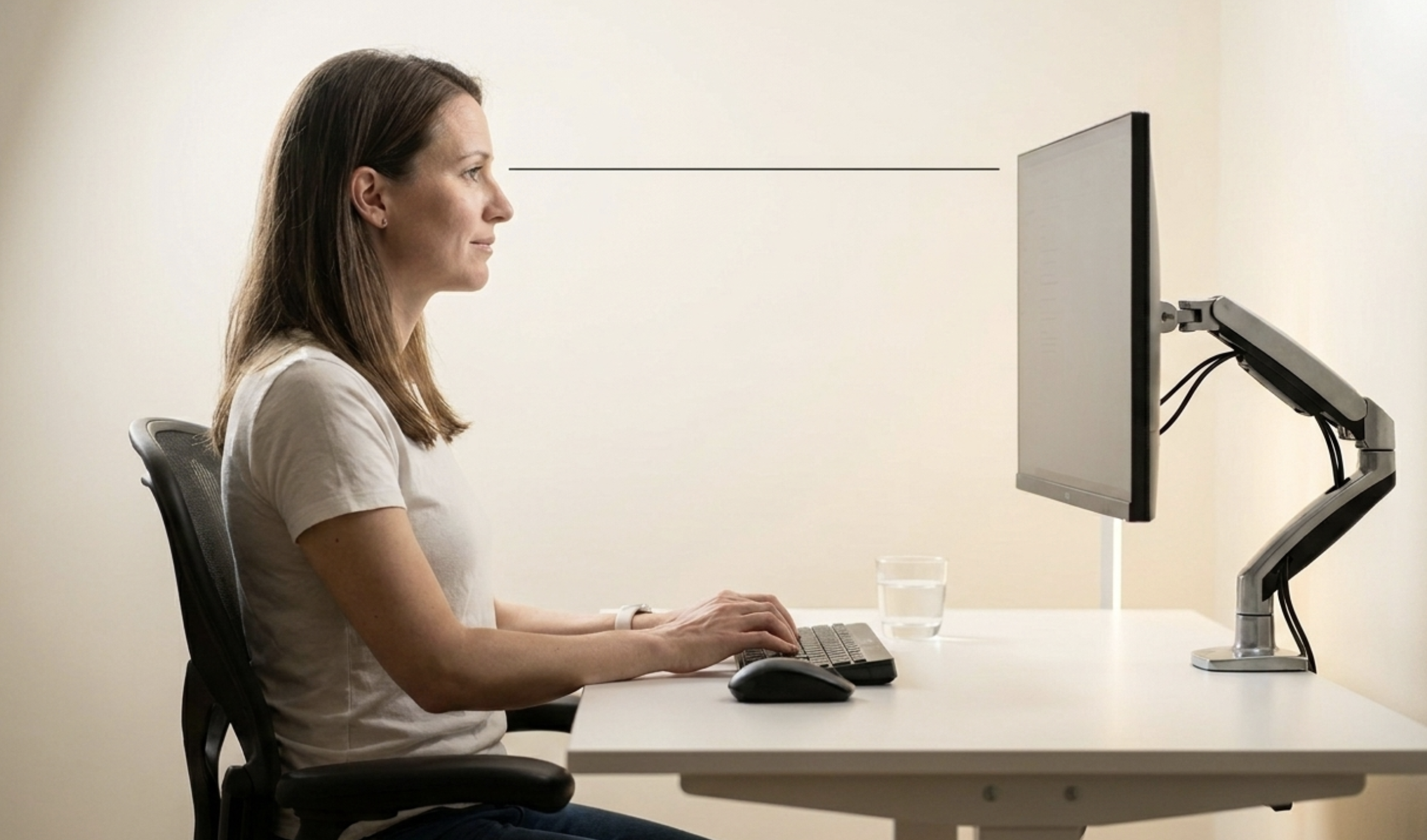
The practical implication is that you cannot fully address screen-related jaw tension with jaw-focused interventions alone. The head position has to change. Monitor at eye level removes the forward tilt and reduces the sustained load on the entire muscle chain — jaw included.
How to tell if this mechanism is primary for you: Your jaw tension is more pronounced on days when you use a laptop on a table (forced downward gaze) compared to an eye-level monitor. You notice neck stiffness and jaw tension appearing together. Looking down at your phone for extended periods reliably triggers jaw awareness.
Mechanism 2: Concentration-Induced Clenching
This mechanism operates independently of posture and is the one most people don’t identify as a driver of their jaw tension — because it happens without any sensation at the time.
When you concentrate on a demanding task — a complex document, a stressful email exchange, a detailed problem — your sympathetic nervous system activates. The same arousal state that improves cognitive focus also increases jaw muscle tone. This is a normal physiological response: elevated sympathetic activation raises baseline muscle tension throughout the body, and the masseter and temporalis are particularly responsive.
The result is semi-conscious jaw clenching during concentration. You’re not consciously clenching. You’re not stressed in the emotional sense. You’re just focused — and your jaw muscles have activated as part of that focus state. The clenching typically produces no sensation during the task, which is why most people are surprised to find their jaw sore after what felt like a low-stress afternoon of focused work.
How to tell if this mechanism is primary for you: Your jaw tension is worse after cognitively demanding work than after passive screen use (watching video, casual browsing). You notice jaw soreness after days that felt low-stress but required sustained concentration. You catch yourself with teeth touching when you do a jaw check mid-task.
The intervention for this mechanism is different from the postural fix: it’s awareness-based. Regular jaw position checks — a 3-second conscious audit of whether your teeth are touching — interrupts the clenching cycle. The correct resting position is lips gently closed, teeth slightly apart, jaw muscles relaxed. This is not a natural position during concentration; it has to be consciously reinstated.
Mechanism 3: Movement Deprivation and Cumulative Stiffness
Muscles are designed for movement. They maintain healthy circulation, clear metabolic byproducts, and resist the development of trigger points through regular contraction and relaxation cycles. When you sit still for extended periods, these cycles stop — muscles stay in a semi-contracted state, circulation reduces, and stiffness accumulates.
This applies to the jaw muscles the same way it applies to the hip flexors or the thoracic extensors. Eight hours of largely static jaw position — whether clenching or not — produces a level of muscular stiffness and trigger point development that lowers the threshold at which tension becomes pain. The jaw that would tolerate a moderate level of clenching fine after a day of regular movement has less tolerance for the same clenching after 8 hours of sitting.
How to tell if this mechanism is primary for you: Your jaw tension is worse at the end of the day and better after a weekend with more movement. Hourly movement breaks have a noticeable effect on your jaw symptoms. Your jaw is stiffer on long-meeting days than on days with the same screen time but more physical movement between tasks.
The intervention here is movement frequency, not total exercise amount. Breaking up sitting with 90-second micro-movement breaks every hour — standing, doing a few chin tucks, opening and closing the jaw fully — is significantly more effective for jaw stiffness than an hour of exercise at the end of the day.
The Smartphone Factor
The smartphone deserves specific attention because it combines all three mechanisms at their worst:
- Posture — looking down at a phone at a 45–60 degree angle creates the most extreme forward head position of any common screen interaction
- Concentration — social media, messaging, and news feeds are specifically designed for sustained attention, producing continuous low-level sympathetic activation
- Movement — phone use typically happens in the same positions for extended periods, often with the neck in sustained flexion
The intervention that has the largest single-factor impact is bringing the phone to eye level rather than looking down at it. It looks slightly unusual, but it removes the most acute postural load from the neck-jaw muscle chain. For people whose jaw tension is primarily driven by phone use rather than desk work, this single change can have a significant effect.
Signs That Screen Time Is Driving Your Jaw Tension
Not everyone who uses screens develops significant jaw tension. These are the signals that suggest screen use is a meaningful contributor for you specifically:
- Jaw soreness or tightness that builds through the workday and is better on non-screen days
- Jaw awareness specifically during demanding screen tasks — editing, coding, complex reading — more than during meetings or calls
- Morning jaw soreness that is worse on weekdays than weekends (suggesting nighttime tension driven by daytime loading)
- Neck stiffness and jaw tension appearing together — a reliable sign of the postural mechanism
- Catching your teeth touching during a jaw check while working — the clearest real-time signal of concentration clenching
- Headaches that develop at the temples in the afternoon — the classic presentation of masseter overload
The Daily Protocol: What Actually Works
The interventions that make a measurable difference are not complicated — but they require consistency, which is why most people don’t maintain them.
The jaw position check (most important single intervention)
Set a repeating reminder — phone or computer — for every 30–60 minutes while working. When it fires, run a 3-second jaw check: are your teeth touching? If yes, consciously release the jaw to the correct resting position: lips gently closed, teeth apart, tongue resting lightly on the palate. This single habit, done consistently, interrupts the concentration-clenching cycle that most desk workers are completely unaware of.
The 20-20-20 rule (every 20 minutes, look at something 20 feet away for 20 seconds) is a useful peg for the jaw check — the eye-rest moment is also the jaw-check moment.
Hourly movement micro-break (90 seconds)
Stand up. Do 3 chin tucks — gently retract the chin straight back while keeping the head level, hold 2 seconds, release. Roll the shoulders backward 5 times. Open the jaw fully and close it twice. Return to work. This 90-second sequence interrupts the cumulative stiffness mechanism and takes less time than the average person spends searching for something in a different browser tab.
Evening wind-down
Apply a warm compress to the jaw and neck muscles for 5–10 minutes in the evening — warmth increases local blood flow and helps muscles release accumulated tension from the day. Follow with the jaw exercises from the full jaw tension exercise guide. Screen use in the hour before bed — particularly cognitively demanding screen tasks — maintains the sympathetic arousal state that delays both sleep onset and muscle relaxation.
Ergonomic Setup That Actually Makes a Difference
Most ergonomic advice is correct but unspecific. These are the changes with the highest jaw-tension impact:
- Monitor height — top of the screen at eye level or slightly below. This is the single most impactful ergonomic change. If you use a laptop without a stand, you are looking down at an angle that guarantees forward head posture. A laptop stand and external keyboard costs approximately £30-50 and removes the primary postural driver.
- Monitor distance — approximately an arm’s length. Screens that are too close require the head to lean forward to focus, recreating the forward posture the height adjustment was trying to prevent.
- Chair height — set so the forearms are roughly parallel to the floor when typing. This supports a neutral shoulder position, which reduces the chain tension from shoulder through neck into jaw.
- Head position check — sit normally, then check: are your ears directly over your shoulders, or are they forward of them? If forward, this is where the sustained jaw muscle load originates.
Protecting Your Teeth from Screen-Time Clenching
Daytime jaw tension from screen use has a direct downstream consequence: nighttime bruxism. When jaw muscles spend 8 hours in an elevated-tension state during the day, the tension doesn’t fully resolve at the moment you finish working. It carries into the evening and — for people who are already prone to nighttime grinding — amplifies the clenching and grinding force during sleep.
This means that even if you implement all the daytime interventions above, your teeth are still at risk from the nighttime consequences of daytime screen use unless you wear a night guard. A correctly specified night guard — hard acrylic, custom-fit — absorbs the compressive force before it reaches enamel. It doesn’t reduce the clenching. It protects the teeth from whatever clenching occurs.
For people whose daytime clenching is significant enough to produce tooth wear during the day — not just at night — a daytime ultra-thin custom guard is a separate consideration. See the full guide to daytime mouth guards for the specifications and available options.
Frequently Asked Questions
Can screen time cause jaw pain?
Yes — through three mechanisms that typically operate simultaneously during screen use: forward head posture transferring load through the neck-jaw muscle chain, concentration-induced clenching from the sympathetic arousal that focused work produces, and cumulative muscle stiffness from sustained static positions. All three mechanisms are addressed by different interventions; addressing only one leaves the others active.
What is tech neck and how does it affect the jaw?
Tech neck refers to forward head posture from looking at screens below eye level. As the head tilts forward from the neutral position, the muscles holding it up must sustain greater load. The jaw muscles are anatomically connected to the neck through a shared muscle chain — sustained neck muscle tension from forward head posture propagates into jaw muscle tension and contributes to clenching and soreness.
Why do I clench my jaw when looking at screens?
Concentration activates the sympathetic nervous system, which raises jaw muscle tone as part of the focus arousal response. The jaw muscles activate during absorbed screen work without any conscious intention or sensation — you’re not aware it’s happening until you do a jaw check or notice soreness afterwards. Forward head posture also requires jaw muscle compensation, which compounds the effect.
How do I stop clenching my jaw at my desk?
The most effective single intervention is a regular jaw position check — set a reminder every 30–60 minutes and consciously check whether your teeth are touching. The correct resting position is lips gently closed, teeth slightly apart. Combine this with monitor-at-eye-level ergonomics to remove the postural driver, and hourly 90-second movement breaks to prevent cumulative stiffness. All three interventions address different mechanisms.
Does a night guard help with screen-related jaw tension?
A night guard protects teeth from the grinding and clenching force that occurs during sleep — including force amplified by daytime tension that carries into nighttime muscle activation. It does not reduce daytime jaw tension or treat jaw muscle pain. The daytime interventions above address the source; the night guard protects your teeth from the downstream dental consequences.
